I'm an idiot. Against all prior experience I went ahead and did something that I shouldn't have. I bough a piece of dodgy-brand AV kit from Jaycar, namely Kworld's "DVD maker 2" video and sound USB capture dongle:
https://www.jaycar.com.au/usb-2-0-dvd-maker/p/XC4867Note that that product page on Jaycar's website is out of date. The version they are currently selling is supposedly compatible with Windows 7 through 10 (I have 7) and comes bundled with Power Director version 12.
The unit comes with software and driver installation instructions but absolutely nothing else. There is no description of how the supplied software is supposed to be used in conjunction with this device at all.
When I run PowerDirector 12 and intuitively click on the "Capture" tab I get this:
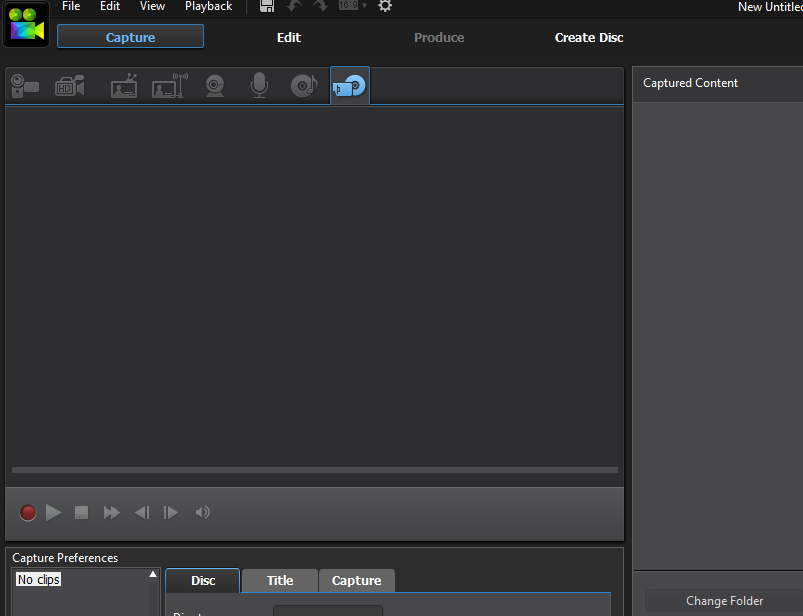
When I plug in my "DVD maker 2" into a spare USB 2.0 port, it is recognized as an audio capture device only, as indicated by the illumination/activation of the microphone icon:

I can click on this microphone icon and record audio through the device.......

....... but I cannot get the device to be recognized by Power Director 12 (or anything else) as any form of video capture device. There is a "One click capture" button on the unit which is presumably supposed to activate recording, but it does nothing whatsoever.
So far I've wasted a few hours of my life with this piece of crap and the most pertinent review I have found is this one:
http://www.toptenreviews.com/computers/peripherals/best-vhs-to-dvd-converters/kworld-dvd-maker-review/.... which declares that the unit is incompatible with the supplied software and the reviewer states that he/she only managed to get the device to work/recognized with a Win XP version of Windows Live Movie Maker, which is no help to me. And so far I've also googled in vain for any information at all pertaining to specifically using this thing with version 12 of Power Director on Win 7.
Just marvel with jaw agape, for example, at this Youtube video "review" of the product, extolling its many virtues:
Holy vacuous waffle Batman! Useful technical content: ABSOLUTELY ZERO! The only thing of worth there is the comment left by Jeff Duck:
This is simply a piece of crap. It says on the box "Win8 Ready" but nothing anywhere else says anything about Win 8. It doesn't seem to do anything. It doesn't look like it does in the video (physical design is slightly changed) and includes a button and a light. The button doesn't seem to do anything and the light doesn't light up. By my experience and reports of others, it doesn't run with the version of PowerDirector that's included in the box and it also doesn't run with the PowerDirector that I got on my Win 8 PC. The instructions don't say anything about how it works - just how to install. The installation instructions just tell you to click on OKs and Continues - not anything about what's actually happening. There's no software interface for the product and the drivers don't include the Win controls that it shows. It just doesn't work and there's no information to tell you what to do to make it work or how to verify that it will work.
Yep!
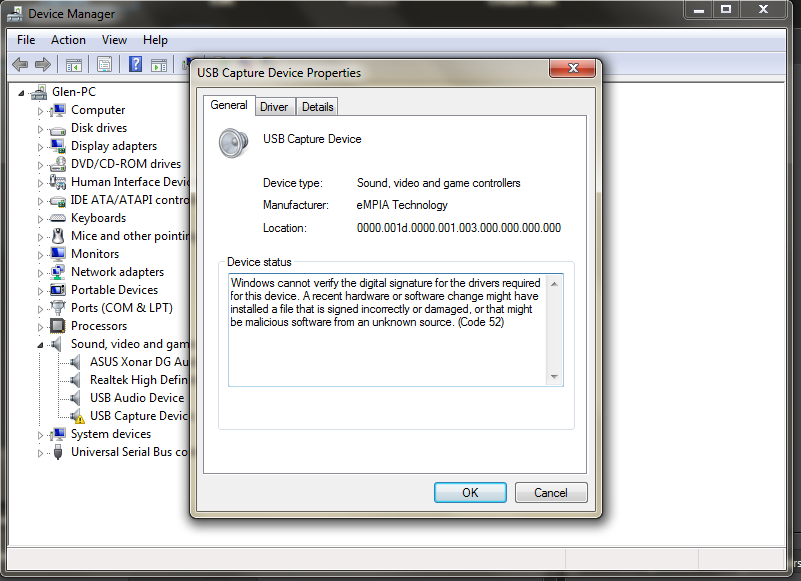
And finally, while the drivers at least seemingly installed correctly for me, Windows in Device Manager still reports a potential issue (whatever relevance the described issue might have or is supposed to mean I don't know.):
I'm now practically satisfied that I've wasted enough of my life on yet another junk/turkey/unusable/not-fit-for-purpose Jaycar product. This post is just a reach-out to anyone potentially reading the forum who might have bought this thing also but maybe figured out how to actually make it work.
That failing, I'm just going to return it in a day or two.

 Home
Home Help
Help Search
 Login
Login Register




